Tiếng Việt
 日本語
日本語 한국어
한국어
In the era of modern manufacturing, speed-to-market has become a critical factor determining business survival. However, traditional workflows — where each engineer works independently on local design files and tasks are handed over sequentially — are creating major bottlenecks. To stay competitive, the mechanical engineering and manufacturing industry is undergoing a significant technological shift toward CAD Collaboration.
1. What is CAD Collaboration? The Inevitable Trend of Modern Design
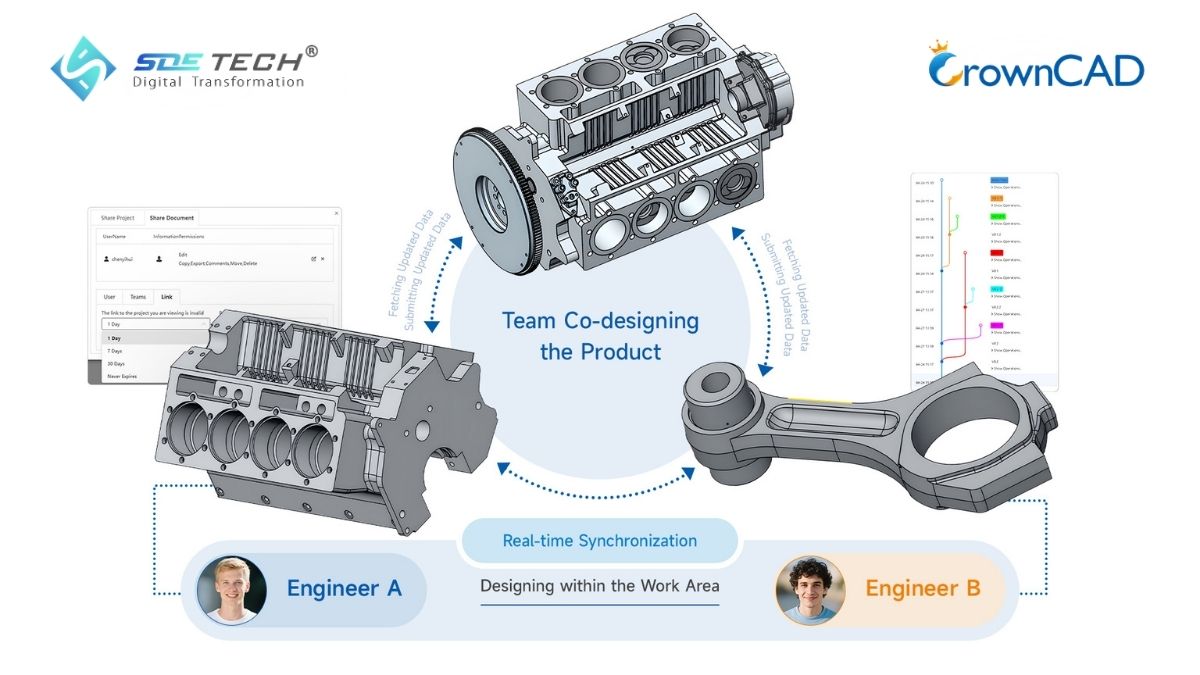
CAD Collaboration is far more than simply sharing design files via email or conventional cloud storage services. It is a solution that allows multiple engineers, managers, and even customers to participate in a unified design environment, interacting and updating data in real time.
In the past, the design process was typically sequential: Engineer A completed the housing design, exported the file, and sent it to Engineer B for internal structure development. After making modifications, Engineer B would send the updated file back. This fragmented workflow often resulted in version conflicts, data loss, and wasted time.
Cloud-based CAD Collaboration has emerged as an inevitable industry trend, completely eliminating geographical barriers and technological limitations. It transforms the working model from isolated, sequential processes into parallel, online collaboration.
2. Key Features of CrownCAD Collaborate
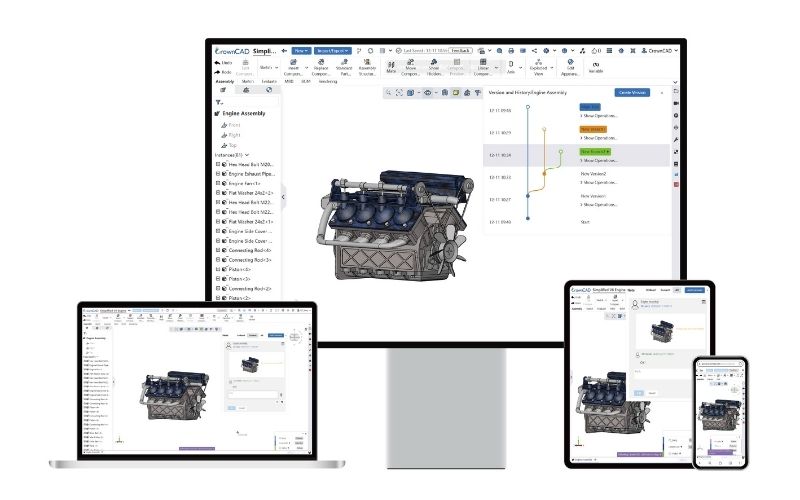
CrownCAD is not only a powerful 3D modeling tool, but also a platform built around a collaboration-first philosophy. It offers core features that redefine the concept of engineering teamwork.
2.1 Concurrent Design
Imagine a complex robot or automotive assembly. With CrownCAD, a structural engineer can design the frame system while a mechatronics engineer simultaneously arranges sensor mounting positions on the very same model. Every modification made by one user instantly appears on the other user’s screen without needing to reload the page or reopen files.
2.2 Role-Based Access Control
Data security is critically important in collaborative environments. CrownCAD enables administrators to define detailed permissions for each project member:
- Who can edit the design.
- Who can only view and measure dimensions.
- Who is allowed to export data into intermediate file formats.
This ensures that a company’s intellectual property remains strictly protected when working with subcontractors or external partners.
2.3 Version and History Control
One of the greatest concerns for design engineers is overwriting data or losing track of who changed what. CrownCAD automatically records every action throughout the entire project lifecycle. Companies can easily review design history, compare differences between development stages, and restore any previous version with just a single click.
2.4 Online Markup and Approval
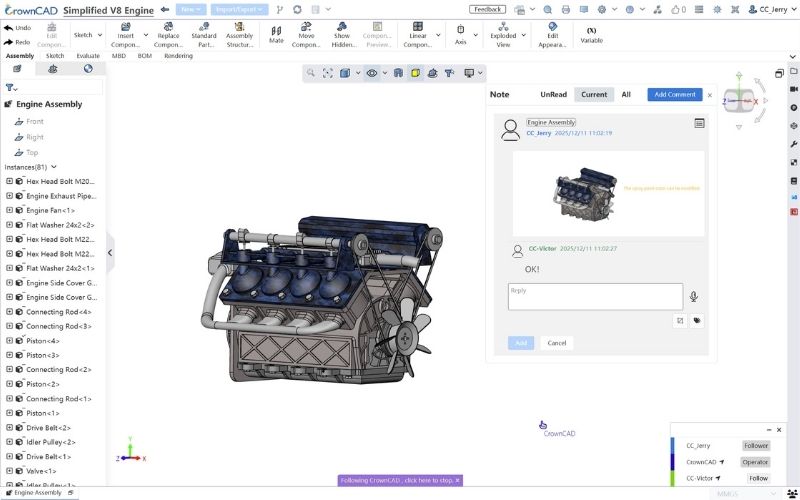
Instead of taking screenshots, writing lengthy emails to describe issues, or organizing time-consuming offline meetings, CrownCAD integrates markup and commenting tools directly into the 3D model environment. Managers or customers can highlight areas requiring modification, tag responsible engineers, and approve designs directly through a web browser.
The Nature of Cloud CAD: In a true Cloud CAD environment, all data is stored securely on cloud servers rather than on local workstation hard drives. Your computer functions primarily as a display interface, while all complex geometric calculations are processed on high-performance servers in the cloud.

3. Benefits of Cloud-Based CAD Collaboration Compared to Traditional Methods
Traditional Desktop CAD systems combined with local PDM infrastructures are increasingly revealing limitations in terms of cost and flexibility. By transitioning to a cloud-based CAD Collaboration solution like CrownCAD, businesses can gain significant advantages.
| Criteria | Traditional Desktop CAD System | Cloud-Based CAD Collaboration Solution (CrownCAD) |
|---|---|---|
| Installation & Configuration | Requires heavy software installation and expensive high-performance workstations. | No installation required. Runs directly in web browsers such as Chrome, Safari, and Edge. |
| Data Conflicts | Frequent file overwrite issues and confusion between versions such as V1, V2, or Final. | No file-based workflow. Only a single source of truth exists for all project data. |
| Remote Working Capability | Limited by internal LAN networks or slow VPN connections. | Work anytime, anywhere, on any device including laptops, tablets, and smartphones. |
| Investment Cost | High upfront costs for hardware infrastructure and perpetual software licenses. | Flexible subscription-based pricing optimized according to actual team size and business needs. |
4. Why Should Businesses Choose CrownCAD for Collaborative Workflows?
Among the many solutions available on the market, CrownCAD demonstrates specialized capabilities that are particularly well suited for manufacturing companies seeking greater operational efficiency.
4.1 Eliminating Time Waste in File Sharing and Data Transfer
On average, engineers spend approximately 15–20% of their working time each week searching for, compressing, sending, and extracting large CAD files. CrownCAD completely eliminates this inefficiency. Instead of transferring files, users simply share a secure link, allowing partners or team members to instantly access the 3D model.
4.2 Optimizing Hardware Costs Through Cloud Computing Technology
With CrownCAD, companies no longer need to invest in large numbers of high-end workstations costing thousands of dollars for office staff, managers, or procurement departments. Using only a standard office laptop or even an iPad, users can smoothly view, inspect, and approve assemblies containing thousands of components.
4.3 Enterprise-Level Centralized Data Security
Data within CrownCAD is encrypted using military-grade standards, both during storage and transmission. By preventing unauthorized downloading of physical CAD files to personal devices unless explicitly permitted, CrownCAD significantly reduces the risk of design data leakage — one of the most critical security vulnerabilities faced by companies relying on traditional Desktop CAD systems today.
5. Frequently Asked Questions About CAD Collaboration on CrownCAD
How Does the System Handle Two People Editing the Same Part Simultaneously?
CrownCAD’s Real-time Sync technology manages this scenario intelligently. When Engineer A is editing a specific feature on a part, the system displays a notification indicator to Engineer B showing that the area is currently being modified. Any changes made by Engineer A are instantly updated on Engineer B’s screen, completely eliminating data conflicts and version collisions.
Will Design Data Be Lost If the Internet Connection Becomes Unstable?
No. CrownCAD includes an Auto-save mechanism that continuously records the project state after every click or modeling operation. If the internet connection is interrupted unexpectedly, the software temporarily pauses while preserving the current session state. Once the connection is restored, all data is synchronized immediately without losing any design work.
Can CrownCAD Collaborate with People Who Do Not Have a Software Account?
Absolutely. This is one of the platform’s most practical features when working with customers or external partners. Users can generate a secure sharing link with view-only permissions. Recipients do not need a CrownCAD account or software installation — they simply open the link in a web browser on a phone or computer to rotate, inspect, section-view, and annotate the 3D model directly for feedback.
CAD Collaboration is no longer a technology of the future — it has become an essential solution for businesses that want to accelerate product development and optimize operational costs. CrownCAD, combined with professional consulting and implementation services from SDE Tech, provides the ideal technological foundation for companies seeking to strengthen their competitiveness within the global manufacturing supply chain.
Contact SDE Tech today to experience CrownCAD in action and receive consultation on a comprehensive digital transformation roadmap for your engineering and design department.
- Website: sde.vn
- Email: sales@sde.vn
- Hotline/Zalo: 085 256 2615 – 0909 107 719