Tiếng Việt
 日本語
日本語 한국어
한국어
In modern industrial manufacturing, speed and accuracy are two factors that directly determine a company’s competitiveness. This is exactly why Cadmould Batch was developed. As a feature within the Cadmould Flex injection molding simulation software ecosystem, batch simulation provides the ability to automate the entire workflow from scenario setup to result generation without requiring continuous user intervention.
1. Why is the traditional simulation workflow no longer sufficient?
Most injection molding projects require engineers to evaluate multiple scenarios: changing materials, adjusting mold temperatures, testing injection speeds, or optimizing gate locations. Every small adjustment can affect product quality, so no scenario can be overlooked during the analysis process.
With the traditional approach, engineers must wait for one simulation run to finish before setting up the next one. This creates a lengthy manual loop, especially when the number of design variations reaches dozens. In addition, reliance on manual operations increases the risk of input errors a small mistake can lead to inaccurate results and waste the entire calculation time.
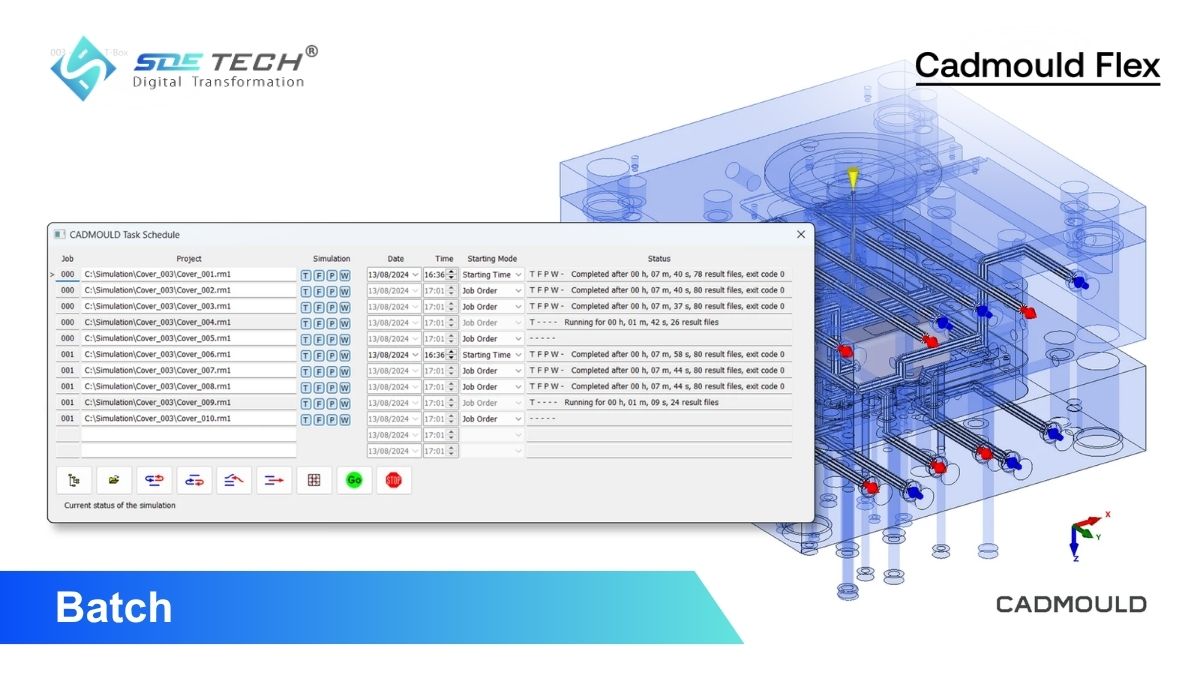
Batch simulation was developed to completely replace this inefficient workflow. Instead of waiting and manually intervening between simulation runs, engineers can prepare the entire task list in advance, prioritize the sequence, and let the system automatically process each simulation in the predefined order.

2. What is Cadmould Batch and how does it work?
Cadmould Batch is a feature within the Cadmould Flex ecosystem that allows users to set up and automatically execute multiple injection molding simulation scenarios consecutively without requiring continuous supervision. It is a tool specifically developed for professional working environments where handling a large volume of simulations is part of daily operations.
The workflow of Cadmould Batch is divided into three clearly defined stages:
- Stage 1: Queue setup and organization: Users prepare virtual injection molding simulation variants, including material parameters, process conditions, mold configurations, and desired analysis factors. Each scenario is then added to the task list and prioritized based on project requirements. The Cadmould Batch interface is designed to be user-friendly, making task organization fast and intuitive.
- Stage 2: Automated execution: Once the queue is activated, the system automatically processes each batch simulation in the predefined order without interruption between steps. Cadmould Batch supports multi-core processing, maximizing computational performance and significantly reducing total completion time. While simulations are running in the background, engineers can fully focus on other tasks without interruption.
- Stage 3: Result storage and organization: After each simulation is completed, the results are automatically saved and organized in a centralized location. Different simulation variants are arranged side by side for direct comparison, enabling engineers to quickly identify the optimal combination of design and process parameters.

3. Key benefits of the batch simulation feature
Integrating Cadmould Batch into the workflow is not simply about reducing manual operations it creates a systematic transformation in how engineering teams operate and make decisions.
- Optimized engineer working time: Previously, engineers had to spend hours waiting for one simulation to finish before starting the next. With batch simulation, the entire workflow runs continuously and automatically, even outside working hours.
- Reduced process errors: Every manual intervention creates opportunities for mistakes, from incorrect parameter input and missed setup steps to executing tasks in the wrong order. Cadmould Batch eliminates most of these risks by ensuring every injection molding simulation analysis is executed precisely according to the pre-approved configuration.
- Faster and more intuitive result comparison: One of the greatest values of batch simulation lies not in running the simulations, but in the post-analysis stage. When results from multiple variants are organized and ready for parallel comparison, engineers can quickly identify the optimal solution instead of manually consolidating scattered data sources.
- Enhanced capability for handling complex projects: With multi-core processing support, Cadmould Batch enables engineering teams to handle multiple complex scenarios simultaneously within the same timeframe.
4. Key features of Cadmould Batch
To better understand the practical value that Cadmould Batch delivers, below is a detailed analysis of the tool’s core functional groups.
4.1 Automated batch simulation execution
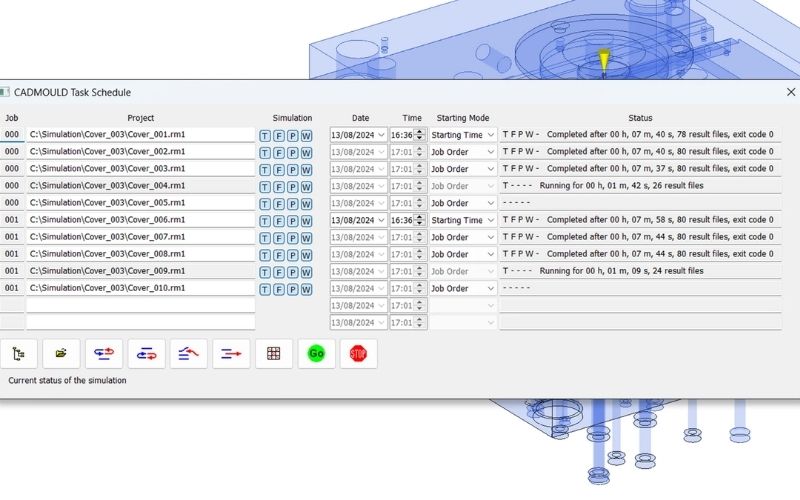
Once users add simulation cases to the list and confirm the execution order, the system continuously processes each case from start to finish without requiring any additional actions. Engineers do not need to monitor the process in real time, as the entire workflow runs in the background.
4.2 Flexible and intuitive task management
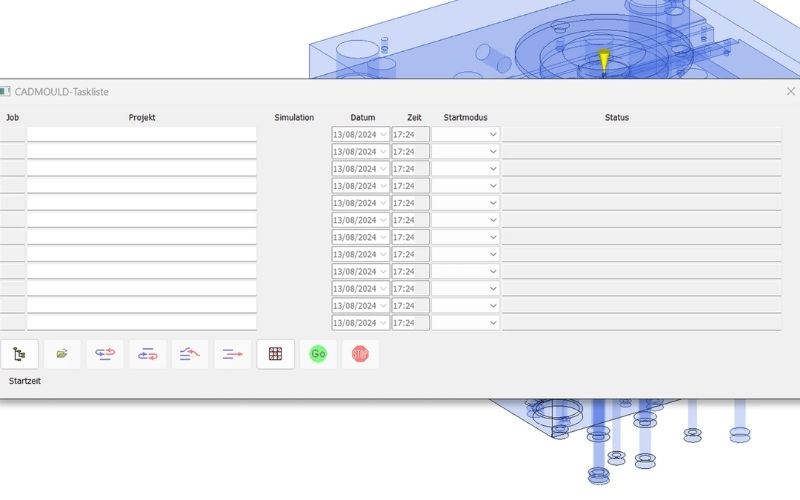
The queue management interface of Cadmould Batch is designed with simplicity and practicality in mind. Users can easily add, remove, or change the priority order of injection molding simulation cases with just a few operations. The Task Schedule window clearly displays the completion status (in percentage) of each task in the queue, allowing users to stay informed of the overall progress even without direct intervention.
4.3 Centralized result organization and storage
Instead of having results scattered across multiple locations, Cadmould Batch automatically stores all results in a centralized location immediately after each simulation is completed. Organizing different variants side by side enables direct comparison, helping engineering teams clearly identify the most optimal combination of design and process parameters for each specific project.
4.4 Minimizing errors through full automation
By replacing all manual intervention steps with a pre-programmed workflow, Cadmould Batch ensures that every simulation case is executed with consistent accuracy and without human-related variability. This is especially important in manufacturing environments that demand high quality standards and consistency across production batches.
5. Integration within the Cadmould Flex ecosystem
Cadmould Batch does not operate independently. The true power of this tool is fully realized when combined with other features within the Cadmould Flex ecosystem.
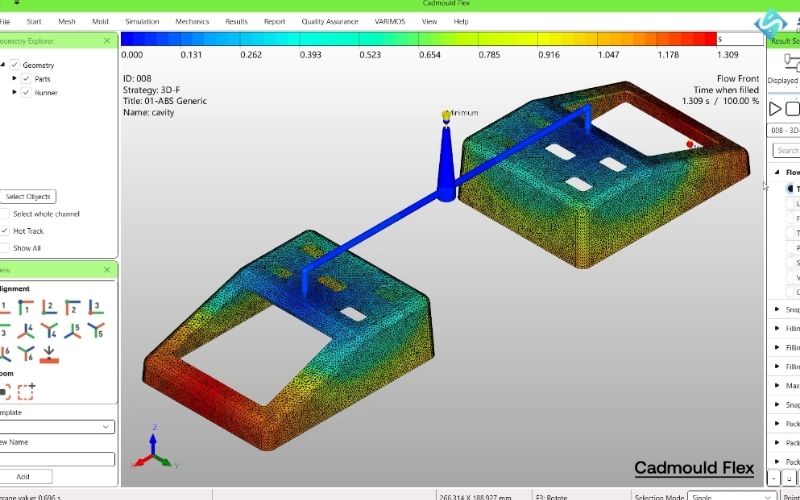
When integrated with Fill, Pack, and Warp, Cadmould Batch enables engineers to analyze the entire injection molding production cycle across multiple variants simultaneously, from the moment the plastic is injected into the mold until the product cools down and stabilizes its shape. This is a comprehensive end-to-end simulation capability that very few tools on the market can provide with such a high level of integration.
In addition, Cadmould Batch is also compatible with Varimos AI, a machine learning application that uses simulation data to identify optimal parameter combinations more efficiently. The combination of batch simulation and artificial intelligence creates a continuous feedback loop: Batch generates large volumes of data, while Varimos AI analyzes and recommends the next optimization direction, significantly shortening the product development cycle.
6. Applications in key industries
Batch simulation with Cadmould Batch is not limited to a specific field. Below are the industries currently benefiting the most from the automation capabilities provided by this feature.
- Automotive industry: Injection molding is the primary manufacturing method for producing components such as dashboards, front bumper assemblies, door trims, and many other interior parts. With hundreds of material variants and mold configurations requiring evaluation, Cadmould Batch helps automotive engineering teams shorten product development cycles and bring qualified components to market faster.
- Aerospace industry: From turbine housings to structural brackets, aerospace components require extremely strict technical standards. Batch simulation enables aerospace engineers to simultaneously test multiple load and material scenarios, ensuring every component meets safety requirements before actual production.
- Medical device industry: Components such as surgical instruments, implant housings, and handheld diagnostic devices require high precision and must comply with strict quality control regulations.
- Electronics and industrial equipment industry: From electrical connectors and heat-dissipation housings to precision gears and industrial pump casings, Cadmould Batch supports comprehensive evaluation of material choices and process parameters.
7. Frequently asked questions about Cadmould Batch simulation
Which software packages include Cadmould Batch?
The batch simulation feature of Cadmould Batch is integrated into the Cadmould Flex Advanced, Flex Premium, and Flex Enterprise subscription packages. These software packages are designed for engineering teams and manufacturing companies that require advanced analysis capabilities and handle large simulation workloads.
Does Cadmould Batch support multi-core processing?
Yes. Cadmould Batch supports parallel execution across multiple processing cores (multi-core processing), maximizing hardware performance and significantly reducing the total completion time for large batch simulation queues.
What does batch simulation mean in injection molding?
In the field of injection molding simulation, batch simulation refers to the automated and sequential execution of multiple different analysis scenarios.
Batch simulation is a practical requirement for any business that wants to maintain competitiveness in modern manufacturing. To learn more about Cadmould Batch and other features within the Cadmould Flex ecosystem, please contact the expert team at SDE Tech for detailed consultation and support in selecting the software package that best fits your needs.
- Website: sde.vn
- Email: sales@sde.vn
- Hotline/Zalo: 085 256 2615