
 Tiếng Việt
 日本語
日本語 한국어
한국어
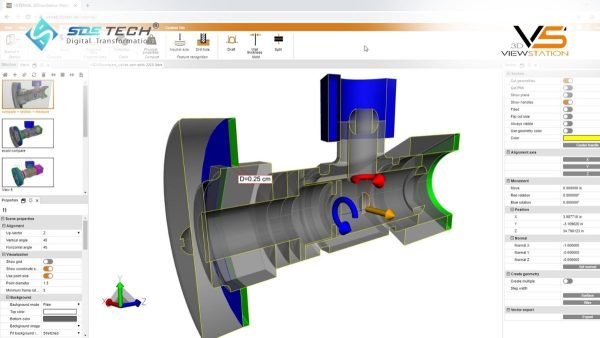
In mechanical and electronics supply chains, equipping full design licenses for departments that only need to review data results in significant budget inefficiencies. SDE Tech introduces 3DViewStation (Kisters – Germany) as a professional NX file viewing software solution to optimize costs. This tool provides comprehensive capabilities, including precise measurement, cross-sectional analysis, and extraction of technical specifications, enabling fast and efficient 3D product quotation workflows without the need to interact with complex CAD systems.
1. Challenges When Working with NX CAD Files in Enterprises
Before exploring the solution, it is important to understand the practical challenges that business, procurement, or engineering teams often face when handling data from customers using Siemens NX.
1.1. High Software Licensing Costs
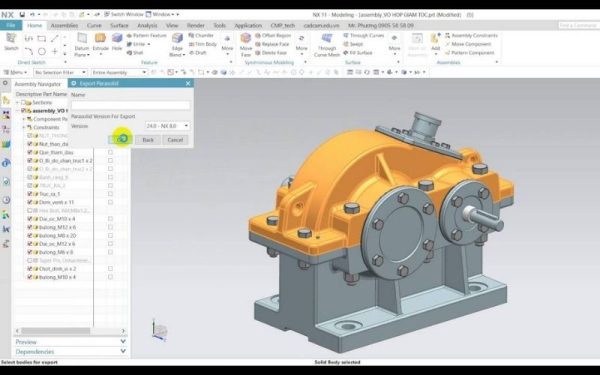
Siemens NX is a high-end CAD/CAM/CAE software. The cost of owning an NX license is significant. For staff in Quotation or Project Management roles, installing NX just to open files and check dimensions is not a cost-effective investment. An alternative NX file viewing software helps businesses optimize costs while maintaining work efficiency.
1.2. High Hardware Requirements
To smoothly handle large assembly files in NX, computers require high-end hardware configurations, including professional graphics cards and large RAM capacity. This creates challenges for office staff or business teams who typically use personal laptops. Using 3DViewStation software effectively resolves this issue with its ability to process data quickly even on mid-range systems.
1.3. Difficulty in Handling Multiple File Formats
In practice, customers provide not only NX files but also formats such as CATIA, Creo, SolidWorks, or neutral formats like STEP and IGES. Having a versatile CAD file viewer allows businesses to flexibly handle all customer requirements without installing multiple software solutions.
2. 3DViewStation – A Leading NX File Viewing Solution
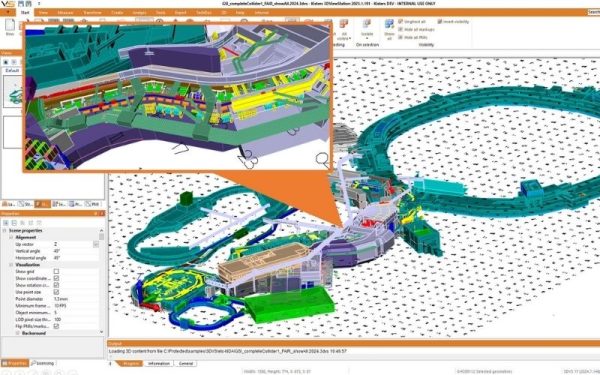
3DViewStation by Kisters is specifically designed to handle extremely large 3D models with remarkable speed. It is an optimal choice for businesses seeking a reliable NX file viewing software.
2.1. Ultra-fast File Loading
The greatest strength of 3DViewStation lies in its speed. The software can open large assemblies with tens of thousands of components in just a few seconds. This is achieved through advanced 3D data compression technology without compromising geometric accuracy. Engineers can quickly view 3D CAD files without waiting for long loading times typically associated with heavy CAD systems.
2.2. Full and Native NX Data Compatibility
Unlike many free viewers that may lose data or cause surface errors, 3DViewStation supports direct and native reading of .prt files from Siemens NX. All information, including assembly structure, material properties, and technical specifications (PMI – Product Manufacturing Information), is displayed clearly and accurately.
3. Optimizing Measurement and Quotation Workflows with 3DViewStation
One of the most critical tasks for business and engineering teams is 3D product quotation. Miscalculations can lead to financial losses or lost customers.
3.1. High-Precision Measurement Tools
This NX file viewing software provides a highly detailed measurement system, including distance, angles, radii, as well as volume and surface area calculations. Quotation engineers can quickly determine the bounding box dimensions to estimate raw material requirements—an essential step in mechanical manufacturing.
3.2. 3D Comparison Feature
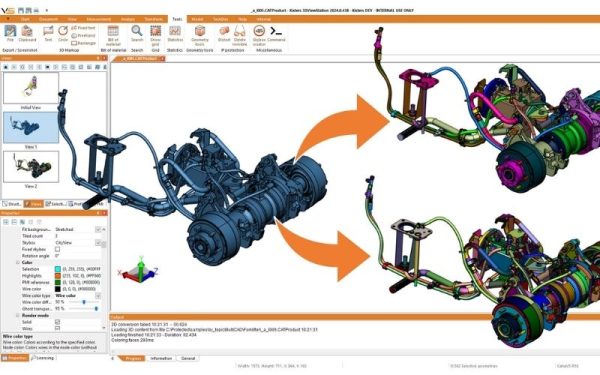
When customers send updated designs, identifying minor changes in 3D models can be challenging. 3DViewStation offers a visual comparison feature between two versions of NX files, clearly highlighting added or removed areas using color coding. This helps optimize the quotation process, ensuring that no technical changes affecting production costs are overlooked.
3.3. Professional Quotation Documentation
The software enables the creation of high-quality technical images and 3D PDF files for sharing with partners. Including detailed measurement visuals enhances the transparency and professionalism of quotations, improving credibility with customers.
4. Advanced Technical Analysis Features
In addition to viewing and measurement, 3DViewStation also provides advanced analysis capabilities typically available only in high-end NX versions.
4.1. Draft Angle Analysis
For industries such as plastic injection molding and casting, draft angle verification is essential.
This NX file viewing software enables quick draft angle analysis, allowing engineers to identify areas that are difficult to manufacture or prone to mold sticking directly from the design review stage.
4.2. Sectioning and Cross-Section Analysis
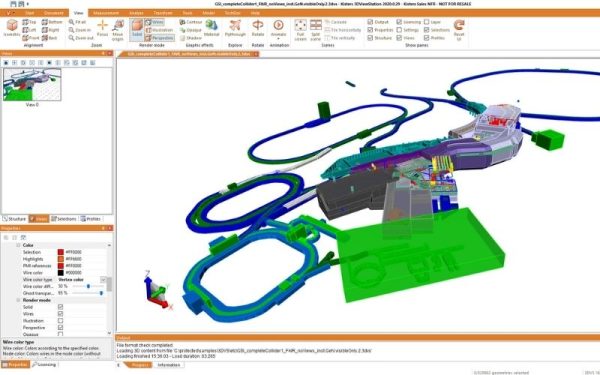
Inspecting the internal structure of complex assemblies becomes much easier with dynamic sectioning tools. Users can move the cutting plane in any direction to check for interferences or assembly clearances between electronic components within enclosures.
5. Why Choose 3DViewStation
SDE Tech not only provides software licenses but also delivers dedicated technical support and resource optimization strategies for businesses.
5.1. Strong Technical Expertise from SDE Tech
With extensive experience in the CAD/CAM/CAE industry, the SDE Tech team understands the technical challenges businesses face when handling NX files. We provide consulting on how to deploy the most suitable NX file viewing software aligned with your existing IT infrastructure, from the Desktop version to the Web Viewer, enabling file access across all mobile devices.
5.2. Sustainable Cost Optimization Solution
Instead of equipping 10 NX licenses, businesses can operate efficiently with only 2 design licenses and 8 3DViewStation licenses. This is a smart investment model that SDE Tech has successfully implemented for many large factories, helping save up to 60% in software costs while maintaining seamless workflows across departments.
6. Frequently Asked Questions about NX File Viewing Software
6.1. Does 3DViewStation require NX to be installed to operate?
Absolutely not. 3DViewStation operates independently and does not require any installation of Siemens NX. It uses its own data-reading libraries to directly interpret the structure of .prt files.
6.2. Can I view NX files on a web browser without installing software?
Yes. SDE Tech provides the 3DViewStation WebViewer, allowing users to access and view 3D CAD files directly on browsers such as Chrome or Safari. This is especially convenient for project meetings or quick data checks on the shop floor.
6.3. Does 3DViewStation support 2D drawings (Drafting) from NX?
Yes, the software fully supports the most common 2D and 3D CAD formats. You can view 2D technical drawings alongside 3D models within the same interface.
Investing in the right NX file viewing software like 3DViewStation is a strategic move that helps businesses eliminate cost and technology barriers. The ability to read NX CAD files without design software, combined with powerful measurement and analysis tools, enables better collaboration between engineering and business teams—accelerating customer response times and optimizing profitability.
Contact SDE Tech today to optimize your workflow with NX CAD data!
- Email: sales@sde.vn
- Hotline/Zalo: 085 256 2615 – 0909 107 719





