
 Tiếng Việt
 日本語
日本語 한국어
한국어
For decades, the image of a design engineer has been closely associated with powerful workstations and software packages weighing tens of gigabytes. However, the rapid rise of cloud computing has sparked a new revolution: browser-based CAD software with no installation required. Today, high-end mechanical design capabilities are fully accessible within a single browser tab, empowering you to create and innovate from anywhere.
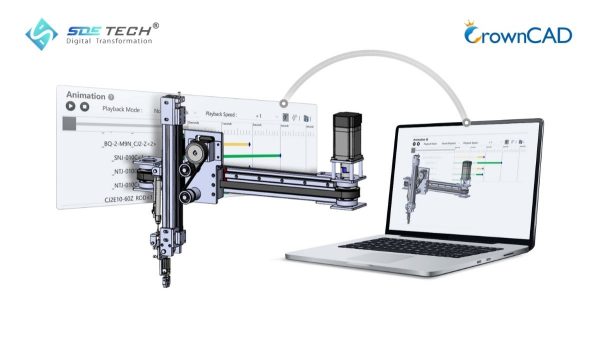
1. Overview of the Cloud CAD Trend (Browser-Based CAD Software)
The rapid advancement of high-speed Internet infrastructure has fundamentally transformed how we access and use engineering tools.
1.1. What is Browser-Based CAD Software?
Installation-free CAD software, also known as Cloud CAD, refers to computer-aided design applications that run entirely on web platforms. Instead of downloading large installation packages and storing data locally, users simply access a URL via web browsers such as Google Chrome or Microsoft Edge to start working. All complex geometric computations are processed on powerful cloud servers, while the visual results are streamed back to the user’s screen in real time—delivering a seamless and responsive design experience.
1.2. The Shift from Desktop CAD to Cloud CAD
This transformation is similar to the shift from installed software like Microsoft Word to cloud-based platforms such as Google Docs. Traditional Desktop CAD systems require high-end hardware resources and involve complex installation, licensing, and maintenance processes. In contrast, Cloud CAD represents the Industry 4.0 era—where flexibility, speed, and connectivity take priority. By eliminating hardware constraints and geographical limitations, Cloud CAD empowers engineers to collaborate and innovate more efficiently than ever before.

2. Key Benefits of Using Web-Based CAD Software
Adopting browser-based CAD solutions delivers clear competitive advantages for both individuals and businesses.
2.1. No Need for High-End Workstations – Significant Cost Savings
With Cloud CAD, the heavy computational workload is handled by powerful cloud servers. This eliminates the need for expensive workstation investments. Even a standard office laptop or tablet can smoothly handle complex 3D models, helping businesses reduce hardware costs while maintaining high performance.
2.2. Access Designs Anytime, Anywhere, on Any Operating System
One of the biggest advantages is cross-platform accessibility. Whether you are using Windows, macOS, or Linux, all you need is a web browser and an Internet connection to start working. You can begin a design at the office and review or edit it on the go—without carrying specialized hardware.
2.3. No Installation or Software Compatibility Issues
Say goodbye to downloading massive installation files or dealing with system conflicts. With Cloud CAD, the software is always up to date. Every time you log in, you are using the latest optimized version—without manual upgrades or downtime.
2.4. Automatic Cloud Storage – No Risk of Data Loss
Unexpected hardware failures will no longer result in lost design data. All files are continuously synchronized and securely stored in the cloud, ensuring your work is always protected and accessible from any device.
2.5. Real-Time Collaboration and Seamless Design Sharing
Collaboration in traditional CAD environments often faces challenges in version control. Cloud CAD allows multiple engineers to work simultaneously on a single model in real time. This capability streamlines online meetings, design reviews, and cross-department collaboration—making the entire workflow faster, more transparent, and more efficient.
3. CrownCAD – A Browser-Based CAD Solution by SDE Tech
SDE Tech proudly introduces CrownCAD — a pioneering solution redefining mechanical design workflows in the Vietnamese market.
3.1. What is CrownCAD? A Powerful 2D/3D Design Platform on the Web
CrownCAD is a professional CAD solution built entirely on cloud computing architecture. Powered by a robust geometric kernel, it delivers a full suite of design capabilities—from sketching and solid modeling to assembly design—all accessible مباشرة within a web browser, without requiring any installation.
3.2. Seamless Compatibility with Industry-Standard File Formats
Despite being a web-based solution, CrownCAD ensures excellent data continuity and interoperability. Users can directly open and edit industry-standard file formats such as DWG, DXF for 2D, and STEP, IGES, Parasolid for 3D. This capability enables a smooth and seamless transition from legacy CAD systems to CrownCAD, minimizing disruption to existing workflows.
Read more: Comparison of DWG and DXF: Differences and Applications in Engineering Design
3.3. Intuitive and Familiar User Interface
CrownCAD features a user-friendly interface that follows globally recognized mechanical design logic. Engineers with prior experience in popular CAD systems can quickly adapt and start designing immediately—without the need for extensive retraining.
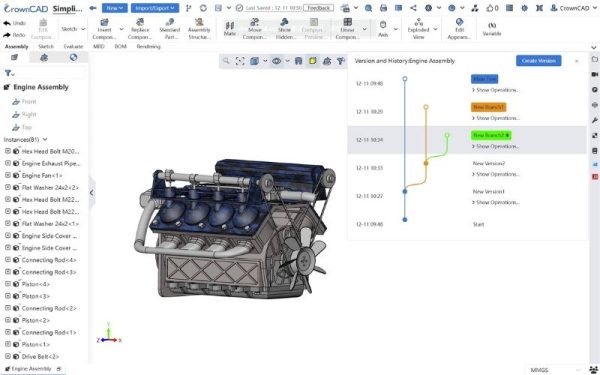
3.4. Built-in Version Control and Enterprise-Grade Data Security
All design changes are automatically tracked with a complete version history, allowing users to easily revert to any previous iteration. In addition, enterprise-level, multi-layer cloud security ensures that sensitive data is fully protected, with access restricted only to authorized users—eliminating the risk of data leakage.
4. When Should Businesses and Engineers Switch to Cloud CAD?
4.1. Enabling Remote Work and On-Site Collaboration
If your engineering team frequently works remotely or on-site, Cloud CAD is an ideal solution. There’s no need to carry bulky workstations—your entire project is accessible anytime, anywhere with just an Internet connection, ensuring seamless productivity across locations.
4.2. When You Need Licensed CAD with Flexible, Cost-Effective SaaS Pricing
Instead of making a large upfront investment in perpetual licenses, CrownCAD adopts a Software-as-a-Service (SaaS) subscription model. Businesses can scale usage based on team size and actual demand, optimizing cash flow while significantly reducing initial investment costs.
4.3. When You Need to Share 3D Models Without Requiring CAD Installation
With CrownCAD, you can simply send a single link for clients to review 3D models directly on their phone or computer. They can rotate, section, and inspect the model in detail—without installing any software—making the design review and approval process faster and more efficient.
5. Frequently Asked Questions About Web-Based CAD Software
5.1. Will 3D design in a web browser experience lag or performance issues?
With modern WebGL technology, CrownCAD delivers a smooth and responsive graphics experience. For small to medium-sized assemblies, lag is virtually eliminated thanks to efficient browser-level hardware acceleration and optimized rendering.
5.2. Does CrownCAD require very high Internet bandwidth?
No. CrownCAD transmits only command and parameter changes rather than continuous video streams. A standard office Internet connection or typical 4G/5G network is sufficient to ensure stable and reliable design performance.
5.3. Is proprietary design data stored in the cloud truly secure?
Data within CrownCAD is encrypted and stored in internationally certified data centers. Cloud storage also mitigates common risks such as data loss due to viruses, hard drive failure, or lost personal devices.
5.4. Can CrownCAD handle large assemblies with thousands of components?
Absolutely. CrownCAD is optimized to manage complex assemblies with thousands of parts while maintaining fast response times and high accuracy.
Browser-based CAD software is the key to unlocking engineers’ creative potential without hardware limitations. With CrownCAD, Vietnamese businesses can now access world-class design technology at a cost-effective price point—backed by dedicated support from SDE Tech.
Are you ready to step into the era of unlimited design? Sign up today for a CrownCAD trial account and experience a dramatic improvement in your productivity.
- Website: sde.vn
- Email: sales@sde.vn
- Hotline/Zalo: 085 256 2615 – 0909 107 719





