
 Tiếng Việt
 日本語
日本語 한국어
한국어
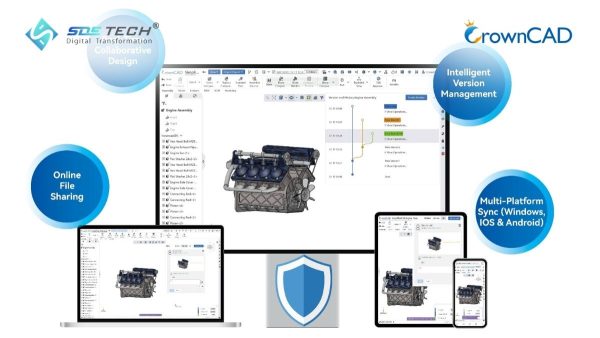
During the process of transferring design data from local computers to a cloud platform, the first question most businesses ask is: Where does my data go, and is it secure? CrownCAD is built with a cloud-native architecture from the ground up, where data security is not an added layer but an integral part of the platform design. Rather than simply storing files in the cloud, CrownCAD implements a multi-layered protection system to ensure that 3D design data, access permissions, and collaboration processes are all tightly controlled and securely managed.
1. Why Is 3D Design Data Security Becoming Increasingly Important?
1.1 When Design Is No Longer Confined to a Single Machine
Today, design teams, engineers, suppliers, and partners often work across multiple offices, cities, or even countries. This distributed working model makes cloud-based collaboration more essential than ever. However, as data is shared more widely, the risks of data leakage, unauthorized copying, and version control issues also increase. As a result, securing 3D design data has become a critical priority.
1.2 CAD Data Is a Strategic Digital Asset
A technical drawing is not just a visual representation of a product. It contains geometry, parameters, design logic, assembly structures, and valuable commercial information. If this data is exposed, businesses may face competitive risks, loss of internal control, and disruptions in production processes.
1.3 Traditional File-Sharing Models Introduce Vulnerabilities
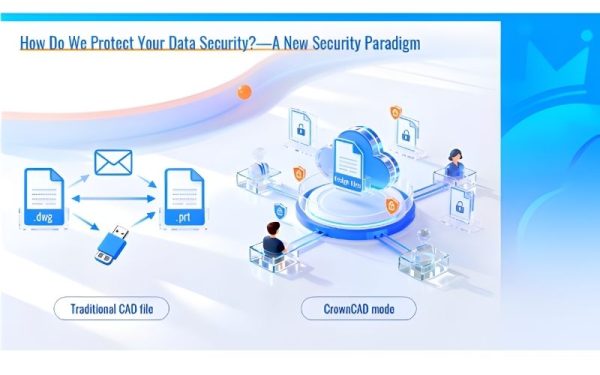
In conventional CAD workflows, original files are often shared via email, USB drives, internal servers, or file-sharing tools. Once a complete file leaves the controlled environment, recipients can view, edit, export, or further distribute it—making it extremely difficult to manage the full lifecycle of the data. This represents a major weakness in traditional collaboration models.
2. What Security Philosophy Does CrownCAD Follow?
2.1 Not Relying on a Single Layer of Protection
CrownCAD recognizes that true 3D design data security cannot depend on a single control point. Instead, it adopts a multi-layered defense approach, combining infrastructure security, application security, data encryption, access management, and backup mechanisms.
2.2 Combining Cloud Security and Application Security
When using CrownCAD in the cloud, data is hosted in high-standard data centers operated by leading cloud providers. On top of this infrastructure, CrownCAD adds application-level protection—creating a dual-layer security model that safeguards both the underlying infrastructure and the software environment.
2.3 Designed for Enterprise-Level Control Requirements
Not all industries are comfortable with public cloud models. Some sectors require strict data sovereignty, internal control, and regulatory compliance. CrownCAD is designed to address these needs through private deployment options, allowing organizations to keep data within their own controlled environments when necessary.
3. How Does CrownCAD Protect 3D Design Data?
3.1 Data Storage
Data storage is a critical component of 3D design data security:
- Data remains within a secure repository: All geometry and parametric data are stored in the cloud and never leave this protected environment. The user’s device only processes lightweight display data for real-time interaction—reducing risks even if the device is lost or stolen.
- No full design files stored locally: CrownCAD does not store complete design files on local machines. The original data always resides in the secure cloud system, minimizing exposure risks.
- Data fragmentation and encryption: Data is not stored as easily readable files. Instead, it is encrypted and segmented into multiple independent blocks, making reconstruction extremely difficult even in case of unauthorized access.
- Multi-layer backup and continuous protection: All actions are automatically saved in real time. The system also includes multi-level backup mechanisms such as geo-redundancy, periodic snapshots, and offsite backups—ensuring rapid recovery in case of incidents.
3.2 Data Transmission
Encrypted Data Transmission: All design data transmitted over the network is secured using HTTPS with TLS 1.3—one of the highest security standards used in financial systems. This ensures protection against interception, tampering, or unauthorized modification during data transfer.
Context-Aware Security: CrownCAD applies adaptive encryption mechanisms based on the sensitivity level of the data, balancing robust 3D design data security with system performance. This approach ensures strong protection while maintaining a smooth and efficient user experience.
3.3 Access Control and Permissions
- Multi-factor authentication (MFA): Ensures that only authorized users can access the system—even if passwords are compromised.
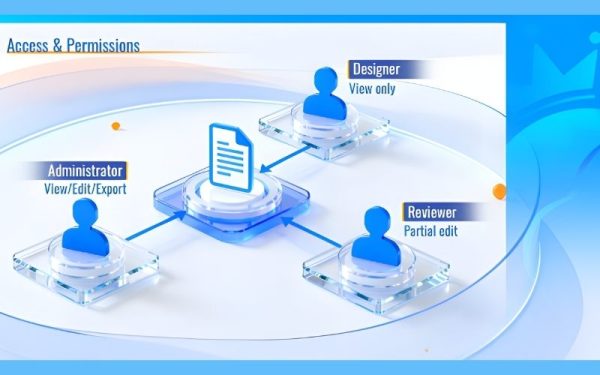
- Role-based access control: Fine-grained permissions define who can view, edit, export, or have limited access to data.
- Scoped data visibility: Users can only access data relevant to their roles. Full design access is restricted unless explicitly authorized—especially important when collaborating with external partners.
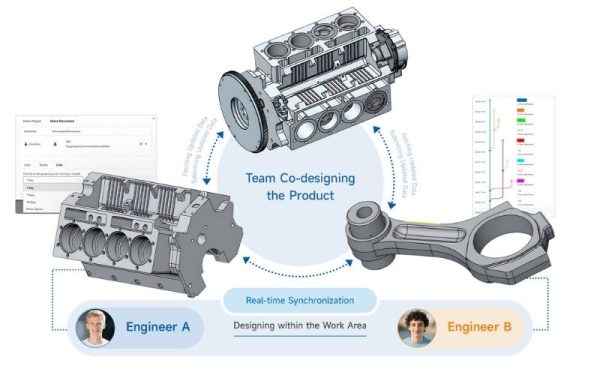
- Secure collaboration channels: Data synchronization occurs over encrypted channels without requiring internal network exposure—supporting secure remote work environments.
4. How Is CrownCAD Different from Traditional CAD Sharing?
CrownCAD introduces several key improvements over traditional CAD workflows:
- No dependency on standalone files: Traditional models rely on complete CAD files (.dwg, .prt, etc.), making control difficult once data is shared externally.
- Shift to controlled data access: CrownCAD uses a cloud-native data model with controlled access, enabling flexible collaboration while maintaining strict data governance.
- Automatic version management
All changes are saved in real time, eliminating manual version control and reducing errors in team collaboration.
5. Frequently Asked Questions About 3D Design Data Security
5.1 Where is design data stored in CrownCAD?
Data is stored in high-standard cloud data centers, rather than as complete files on user devices.
5.2 Are original design files stored on user computers?
No. Local machines only cache lightweight display data for real-time interaction, not full design files.
5.3 Does CrownCAD encrypt data during transmission?
Yes. All data is secured via HTTPS/TLS 1.3 during transmission.
5.4 Who can view or edit data in CrownCAD?
Access depends on permissions assigned by administrators. The system supports detailed role-based access control, including viewing, editing, exporting, or restricted access.
*Content adapted and refined from: crowncad.com
CrownCAD secures 3D design data through a multi-layered architecture, including secure cloud storage, data encryption, protected transmission channels, multi-factor authentication, granular access control, and robust backup mechanisms. For organizations transitioning from traditional CAD workflows to a cloud-native model, this represents a highly effective approach—enabling seamless collaboration while maintaining strong control over design data. Contact SDE Tech today to learn more about cloud-native CAD platforms:
- Website: sde.vn
- Email: sales@sde.vn
- Hotline/Zalo: 085 256 2615 – 0909 107 719





