
 Tiếng Việt
 日本語
日本語 한국어
한국어
In the roadmap of cloud-based CAD software development, listening to real user feedback is a key factor in product refinement. The newly released CrownCAD 2026 R2 marks a significant milestone in optimizing user experience (UX) and enhancing advanced design capabilities. In this article, SDE Tech takes an in-depth look at the latest updates in this release—from the sketching environment and 3D design to sheet metal, drawing output, and bill of materials (BOM) management.
1. Major Enhancements in the Sketch Environment (Sketch)
The sketch environment is the starting point of every design concept. With CrownCAD 2026 R2, engineers will experience significantly greater flexibility thanks to three key enhancements that substantially reduce initial setup and modeling time.
1.1 Direct DWG Import into Sketch
Previously, reusing legacy 2D drawings often required multiple conversion steps. With the new Insert DWG feature, users can now import local DWG files directly into the active sketch environment. Once the command is selected, all geometric data is brought into the project and accurately placed on the working plane, enabling seamless reuse of existing design data.
1.2 Flexible Sketch Copying Between Planes
Shortcut-based operations have been further enhanced. Users can select any sketch and copy it using Ctrl+C. What sets CrownCAD 2026 R2 apart is the behavior of the Ctrl+V paste command:
- Standard paste: The sketch is created on the default Front reference plane.
- Paste with a preselected target plane: The sketch is pasted precisely onto the selected plane.
This improvement is particularly valuable when creating identical profiles at multiple locations within a 3D space.
1.3 Co-axial Constraints in 3D Sketching
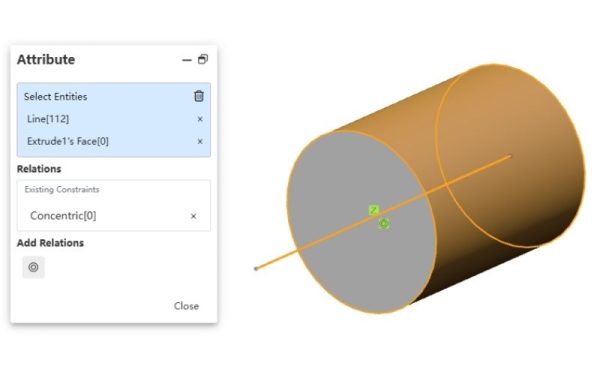
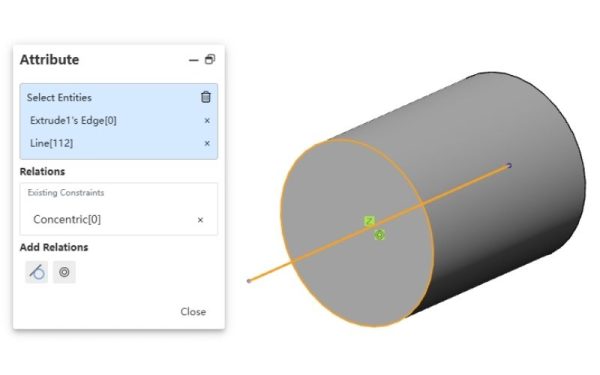
For piping systems and wireframe structures, 3D Sketch functionality is critical. The new Co-axial Constraint allows users to select straight lines, cylindrical surfaces, or arcs in 3D space and apply a coaxial relationship. This ensures that the selected entities always remain aligned with the axis of the cylindrical surface or circular arc, maintaining absolute geometric accuracy and consistency within the three-dimensional space.
2. Enhancements to 3D design and sheet metal commands
The ability to create complex geometry is a key benchmark of a CAD system’s capability. CrownCAD 2026 R2 places strong emphasis on improving the handling of transitional surfaces and sheet metal features.
2.1 Advanced control in the Loft Boss/Base command
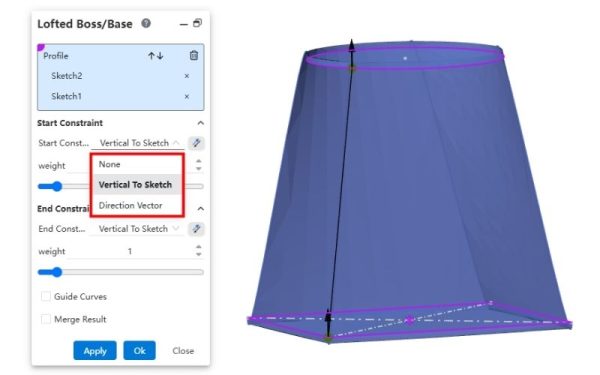
The Loft command (geometry generation through multiple profiles) has been enhanced with more powerful start and end constraints. Three new constraint types have been introduced:
- Direction Vector: Controls the loft direction based on a specified vector.
- Perpendicular to Sketch: Forces the loft to be perpendicular to the sketch plane.
- Tangent to Face: Ensures a tangential transition to an adjacent surface.
This enhancement enables industrial designers to precisely control surface smoothness and aesthetic quality, ensuring the highest level of accuracy and visual refinement in product design.
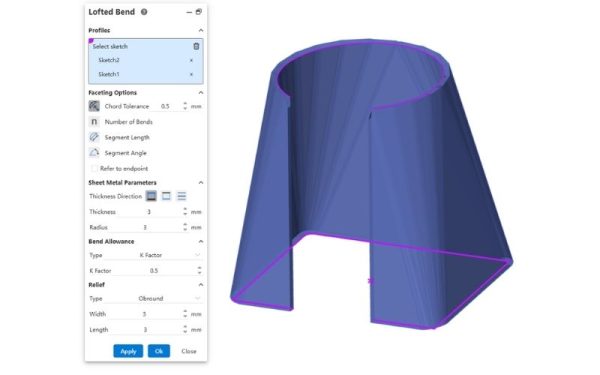
2.2 Lofted Bend Feature for Sheet Metal
In sheet metal fabrication—especially in HVAC systems—transition parts from square to round cross-sections (reducers and transition cones) are extremely common. The new Lofted Bend feature in CrownCAD 2026 R2 is designed specifically to address this requirement. It enables the creation of sheet metal parts that can be accurately flattened directly from lofted profiles, providing strong support for downstream processes such as laser cutting and press braking.
3. Optimizing the Technical Drawing Environment (Drawing)
2D drawings are the universal language between design and manufacturing. The enhancements in this area focus on standards compliance and faster annotation workflows.
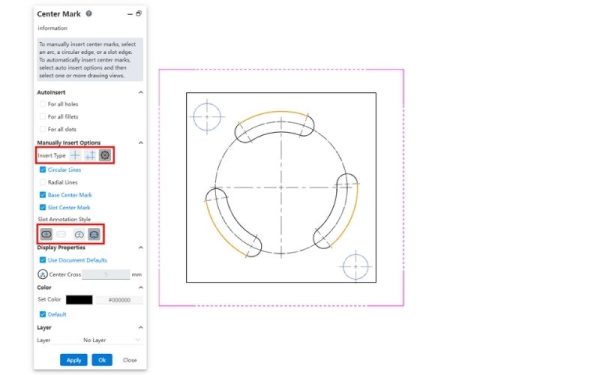
3.1 Expanded Centerline Creation Capabilities (Centerline)
The Centerline command has been comprehensively upgraded. The system now supports creating centerlines through arc slots and other complex sketch entities. In parallel, dimensioning workflows for both linear and circular slot annotations have been fully synchronized.
The workflow is straightforward: activate the command, select the projected geometry or sketch entities, define the display style, and confirm. One important note is that the system enforces standard consistency—different annotation standards cannot be mixed within a single dimensioning operation.
3.2 Adaptive Multi-Standard Hole Callouts
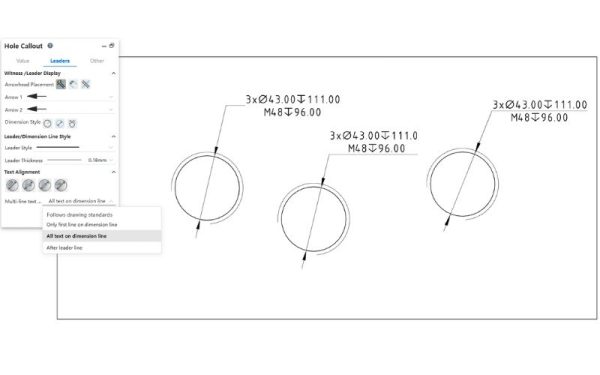
Each manufacturing market (Europe, the United States, China, etc.) follows its own drawing standards. The enhanced Hole Callout feature now supports customizable multiline text positioning to comply with GB, ISO, or ANSI standards.
Users can define the desired standard in Document Properties. When applying the Hole Callout command, the default position and layout of hole information will automatically adapt to the selected standard. This ensures that drawings remain professional, clear, and fully compliant with international drafting conventions.
4. Intelligent Material Management with the BOM Tool
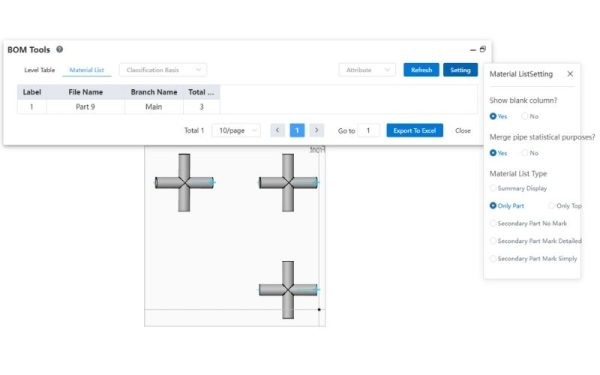
An accurate Bill of Materials (BOM) is essential for cost control and efficient inventory management. In CrownCAD 2026 R2, a small yet highly valuable enhancement has been introduced: Pipe BOM.
Within the BOM breakdown table, users can enable the “Merge Pipes” option. When activated, pipe segments sharing the same technical specifications are automatically consolidated into a single BOM item, with the total required length calculated by the system. This capability allows procurement teams to quickly understand the overall material requirements without manually summing individual pipe segments, reducing errors, saving time, and improving purchasing efficiency.
5. CrownCAD vs. Traditional CAD Software
Why are more and more enterprises shifting toward CrownCAD? The comparison below provides a clear snapshot of the key differences between traditional CAD solutions and modern cloud-based CAD like CrownCAD:
| Criteria | Traditional CAD Software | CrownCAD (Cloud CAD) |
|---|---|---|
| Installation & Hardware | Requires high-end workstations, heavy local installation, and significant disk space. | No installation required. Runs directly in a web browser and operates smoothly even on low-spec machines. |
| Team Collaboration | File exchange via email or servers, prone to version conflicts. | Real-time collaboration. Multiple engineers can work on the same model simultaneously with always up-to-date data. |
| Data Management (PDM) | Often requires purchasing an additional, costly PDM module with complex file management. | Built-in PDM. Version control and access permissions are managed directly on the cloud platform. |
| Feature Updates | Annual updates (Service Packs) that require time-consuming downloads and reinstallation. | Automatic updates. Users always access the latest version (such as 2026 R2) immediately upon login. |
| Cost | High upfront license investment and substantial annual maintenance fees. | Flexible subscription model, optimized for SMEs to reduce operational costs. |
This comparison demonstrates that CrownCAD not only keeps pace with traditional CAD software in terms of design functionality (as outlined above), but also clearly outperforms it in data management, flexibility, and hardware cost optimization—key drivers of Industry 4.0 adoption.
6. Frequently Asked Questions (FAQ) about CrownCAD 2026 R2
6.1 Can CrownCAD open files from other CAD software?
Yes. CrownCAD offers strong compatibility and supports import/export of common neutral formats such as STEP, IGES, and Parasolid, as well as direct import of DWG/DXF files, as highlighted in this update.
6.2 Is working on the cloud secure for design data?
CrownCAD uses enterprise-grade data security protocols, including end-to-end encryption and automatic backups. This approach often provides higher data security compared to local storage, which is more vulnerable to viruses or hardware failures.
6.3 Do I need a high-performance computer to use features like Lofted Bend or 3D Sketch?
No. Since CrownCAD performs processing on powerful cloud servers, your local computer mainly handles visualization. Even a standard office laptop can deliver smooth design performance.
With CrownCAD 2026 R2, the development team has clearly demonstrated its commitment to delivering a design platform that is not only robust in geometric modeling, but also refined in every aspect of user interaction. From DWG data import and complex Loft surface handling to intelligent BOM management, every enhancement is aimed at helping engineers work faster and more accurately. If your organization is looking for an advanced cloud-based CAD solution that optimizes both cost and performance, contact SDE Tech today.
*Content compiled from CrownCAD materials
SDE Digital Technology Co., Ltd. (SDE TECH)
- Email: sales@sde.vn
- Hotline/Zalo: 085 256 2615 – 0909 107 719
Explore more articles:
- CrownCAD Là Gì? Đánh Giá Phần Mềm CAD 3D Đám Mây Tích Hợp AI Thế Hệ Mới – SDE TECH
- CrownCAD giúp doanh nghiệp ngành Automation tăng 80% hiệu suất và giảm 50% chi phí
- CrownCAD giúp doanh nghiệp tiết kiệm hơn 40% chi phí





