
 Tiếng Việt
 日本語
日本語 한국어
한국어
As engineers, we see this millions of times. Many people frantically dig through file systems to find a document or a request sheet for an overdue project or a bounced email thread. Around 5 or 10 people are trying to find the latest version of a model so we can prove that the most recent design change will not cause additional cost to the company. But then those changes must be propagated to five other models, and the cycle of disruption starts all over again.
This becomes even more chaotic when models are stored in different repositories around the globe and we work across multiple domains with other partners within the company.
Current Engineer-Centric Workflow
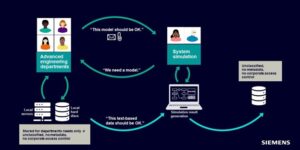
In addition to the clearly assigned engineering tasks of searching for these models, we face several other issues:
- Where should we store these results once they are created?
- We have found a place to store these models; now who can access them, and are they actually able to access them?
- How can engineers ensure that these latest models are used for other simulations?
To address these challenges, Teamcenter provides a system simulation model management solution included in Teamcenter Simulation
Teamcenter-Managed Environment
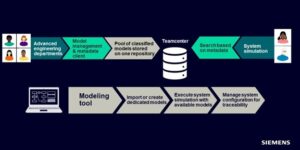
Now that this system is available, a simulation needs to be performed. Engineers search for the golden copy of the model, open it directly from Teamcenter, run the simulation, and then save it back into Teamcenter. No more frantic scrambling for models and requests — just perform a simple search operation in Teamcenter.
Model Management
What’s new in Simcenter Flomaster & Simcenter Amesim 2021.2 is that system simulation tools can be integrated into Teamcenter through Teamcenter Simulation. This allows models to be stored in the Siemens PLM environment, enabling system simulation users to gain all Teamcenter PLM benefits and manage these models so engineers can focus on more critical tasks instead of searching for missing models.
Simcenter Amesim
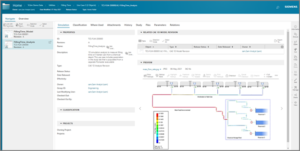
With this new capability, simulation specialists can exclusively control and store models created with Simcenter Amesim within the Teamcenter environment for model management. These models can then be used by other users.
Users can open models directly from the active workspace and create analyses based on these models. Parameter changes can be applied and simulations executed; users save results into the uploaded staging catalog where they can be visualized in the embedded viewer. After the model is closed, external users can review relationships among analysis and reference models as well as the saved and visualized result files.
Simcenter Flomaster
In Simcenter Flomaster 2020.2, authors can store and publish models to Teamcenter to run Simcenter Flomaster in managed mode, similar to Simcenter Amesim. The latest Simcenter Flomaster 2021.2 version now also supports parameter management.
Parameter Management
For each model, there is a dedicated tab for its key parameters. In the study tab, parameters are automatically displayed within Teamcenter and are selected and read as KPIs and key input data.
Users can launch Simcenter Flomaster directly from Active Workspace and run simulations in one of two ways:
- Traditional — Open the GUI, apply changes, run the simulation, and publish processed results via the results viewer or through a .txt file.
- Batch run — Simulations run silently in the background without opening the GUI; less experienced users can edit study tab parameters and then observe KPI impacts.
Working with these KPIs and displaying them in Teamcenter allows Simcenter System Simulation tools to become part of the digital engineering parameter thread described in more detail here.
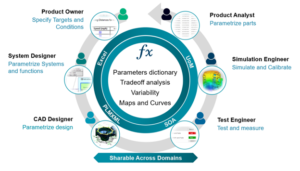
Using this framework enables other MBSE (Model-Based Systems Engineering) stakeholders to shorten product design cycle time, avoid late-stage design rework, and increase the likelihood of eliminating costly physical prototypes.
Source: Siemens
SDE Digital Technology Co., Ltd. (SDE TECH) was established in 2014. By 2018, we were honored to become a Smart Expert Partner — a leading partner of Siemens Digital Industries Software in the Southeast Asia – Asia Pacific region for Siemens NX (Unigraphics NX), Simcenter, Solid Edge, Tecnomatix, and Teamcenter management solutions. Organizations and customers who need to contact SDE TECH can use the following information:
E-mail: sales@sde.vn – tech@sde.vn
Hotline: 0909107719
Website: www.sde.vn





