
 Tiếng Việt
 日本語
日本語 한국어
한국어
DIGITAL IMAGE CORRELATION (DIC) – WHY AND HOW
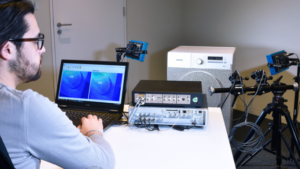
Digital Image Correlation with Simcenter Testlab
If your task is to improve designs and develop high-performance products, you need to understand the structural state characteristics. Unfortunately, standard measurement techniques using strain gauges may provide only limited, local information about materials and loaded structures. Moreover, sometimes you need to attach physical sensors to very thin materials, which is practically impossible.
Out-of-plane deformation of a pump disc under increasing pressure
And it doesn’t stop there. When testing your products under nearly static conditions (gradually increasing loads) or transient events, you need to capture and identify hot spots—points and locations with higher responses and greater likelihood of damage or cracking. But how can you instantly determine these points without relying on numerical simulation? Or do you depend solely on experience?
Digital Image Correlation: A new paradigm for material and structural testing
To address these testing challenges, the latest release of Simcenter Testlab 2021.1 introduces a new solution – Digital Image Correlation (DIC). With this tool, you can identify hot spots as soon as cameras are pointed at the tested object. You receive data with extremely high spatial resolution without risking missing critical hot spots or overloading your test structure with sensors.
Bag deformation during drop testing measured with high-speed cameras
And if that’s not enough, you can also use it for vibration testing. This is possible thanks to high-resolution, high-speed cameras and comprehensive processing algorithms.
A practical example
Consider the number of sensors, cabling systems, and complex setup required to visualize dryer modes. Here, we use only two cameras and prepare the surface accordingly. We achieve experimental shapes with the same spatial resolution as a finite element model.
In short, Digital Image Correlation is an optical-digital measurement technique. It extracts complete field information of the tested object from digital images captured by cameras. From object shape, deformation, and displacement, you can easily extract strain, velocity, and acceleration.
Digital Image Correlation in four simple steps
First, prepare the area you want to test with a high-contrast random pattern. Second, set up your camera, add some artificial lighting, and calibrate your setup with reference targets. Third, record images of the loaded structure. Finally, process the images and enjoy the results.
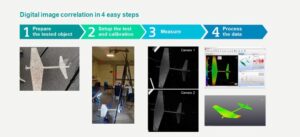
Simcenter Testlab 2021.1 – Digital Image Correlation Workflow
Using a single camera for DIC is possible. However, using two (or more) cameras in a stereoscopic setup offers several advantages. You can not only accurately reconstruct object shapes and measure 3D displacements and deformations, but also extract more precise and robust results.
And don’t worry. If your structure is too large to fit into a single camera view or you want a full 360-degree view around objects, you can combine as many cameras as needed.
We are excited to implement Digital Image Correlation with this Simcenter Testlab release. We believe this tool will enhance your testing efficiency and provide unique insights into the real state of tested objects.
Source: Siemens
SDE Digital Technology Co., Ltd. (SDE TECH) was established in 2014. In 2018, we were honored to become a Smart Expert Partner – a leading partner of Siemens Digital Industries Software in Southeast Asia – Asia Pacific for Siemens NX (Unigraphics NX), Simcenter, Solid Edge, Tecnomatix, and Teamcenter solutions.
 Enterprises and customers wishing to contact SDE TECH via:





